Saturday, 4 March 2017

Secure your Android being haked

How To Secure Your Android Being Haked  


Below  are the some methods by which you can easily secure your android device to be hacked by hackers, So better choice to be implement to all these methods and stay safe with your device.

Avoid third party App :-  Any thing download from unofficial site can cost you huge, no doubt you can get some paid application free but there are many virus in the file that are you taking with you with the app. So better is to avoid third party installation and use only and use only official site like google play store to download the file or you can say app.


Use data encryption setting :- The best way to secure your android is to encrypt all the securities with strong password. This will greatly help you to protect your android from and unauthorized access and all your data and privacy will be secure by this.


Always keep the software of your device update :- New update of android always come with some new features and with fixing of the bug that might preset in the previous version and ifyou don't update the device then  the hacker might use that can hake your android. 


Don't store your password in any app :-  In android different app sync with each other, So don't save your password in any off third party app as this can be easily cracked by any other app. 


Don't use public/free WiFi:- Always remember that the free WiFi can cost you huge as hacker can easily bypass all securities through this WiFi and can easily hack you android device and access your personal data. 


Friday, 3 March 2017

Various uses of F1 to F12 keys in Windows

Various uses of F1 to F12 keys in windows

#Uses of F1 key :

  • F1 key almost everywhere used for "Help". If you are using windows OS and want help anywhere then press F1 key, this will open up help windows for you.
  • Sometimes F1 key is used for BIOS(press F1 when your computer is about to boot)

#Uses of F2 key :


  • Rename the chosen file or folder 
  • Alt + Ctrl + F2  Opens the document as a Microsoft word.


#Uses of F3 key :

  • Win + F3 Advance search windows open in Microsoft Outlook
  • Shift + F3 Changes the content in Microsoft word, from upper to lower case or capital letter at the start of each one expression.                                                                                                            
#Uses of F4 key :

  • This opens location bar.
  • Alt + F4 close the system window in windows.

#Uses of F5 key :

  • Refresh the present page(Work in all advance program)
  • Running a slide demonstrate in power point.

#Uses of F6 key:

  • Move the cursor in location bar.
  • Ctrl + Shift + F6 Open document in Microsoft word.

#Use of F7 key :

  • Mostly used for spelling and grammar in document program like Microsoft (Word,Power point etc)
 #Use of F8 key :

  • Pressing F8 key while your PC is about to boot will result in to booting your PC in safe mode.

 #Use of F9 key :

  • The F9 key does not have any functionality in window. It may how ever be used in some individual program.

 #Use of F10 key :

  • Activates Menu in open organize window.
  • Shift + F10 work some as the right mouse click.

 #Use of F11 key :

  • F11 key will take you to full screen mode and it can be used and work in any browser.

 #Use of F12 key :

  • Open the save as in Microsoft word.
  • Ctrl + Shift + F12 print a document in Microsoft word.


Tuesday, 28 February 2017

How to trim and cut video from VLC

How to trim and cut video from VLC


How to use VLC as a video cutting tool

to cut video in VLC follow the steps given below,


1) Open VLC media player.


2) Play the video which you want to trim and note the time in the video from where you want to obtain the trimmed video and also note the and time up to which you want the video trimmed. Take the time in second. For example if you want to start cutting from 2 minute and 30 second , end cutting at 5 minute and 4 second, the start time will be (2*60 + 30)= 150 second and stop time will be (5*60 + 4)=304 second. These value will be needed later.


3) Now click on Media in Menu bar.


4) In the drop down menu, click on convert/save . Or you can press Ctrl+R short cut key combination to directly reach media option.


5) Click on the add button on the right of the the file selection box to load the video which you want to cut.


6) In the extended option, enter the start time which you noted earlier, Notice that in the edit option field a :start-time = ### staring will be added. There is not an option to add the stop time. So you need to added stop time in the same same format in the edit option manually. Like this 
:stop-time = ###


For our example the edit option text field should look like that in the image given below:-


7) Click on convert/save on the bottom right side and follow all the steps to convert a video in VLC.


8) Click on start to begin the cutting process. 


Wednesday, 22 February 2017

Create an iphone hotspot

How to create an iphone hotspot


Step 1 ; Tap the setting icon.

Step 2: Then tap on cellular and turn on cellular data.Make sure to set it to 3G or 4G in the cellular data option.

Step 3 : Go bake tap personal hotspot and turn it on.


Step 4 : Tap on wifi password and enter password you would like to connect your device. At the same time it will prevent other from from connecting to your wireless hotspot.


What are the dangers of creating an iphone hotspot...


  • There is always possibility that someone will try to connect to your iphone hotspot and use your bandwidth without your knowledge. If you have set up a password so you should not worry about this. How ever someone guess your password you will be notified when he or she get connected to the wifi hotspot.If this happen so you can react in time.


Thursday, 16 February 2017

Hack your friend whats app account

How to hack your friend's or Girl friend whats app account


                You will have to download and install the my spy app on to the victim's phone on which you want to access and monitor the whats app messages. Make sure that You can keep the victim's phone with you for a few minutes....


               Before proceeding make sure that the victim gives permission to access and monitor their mobile...


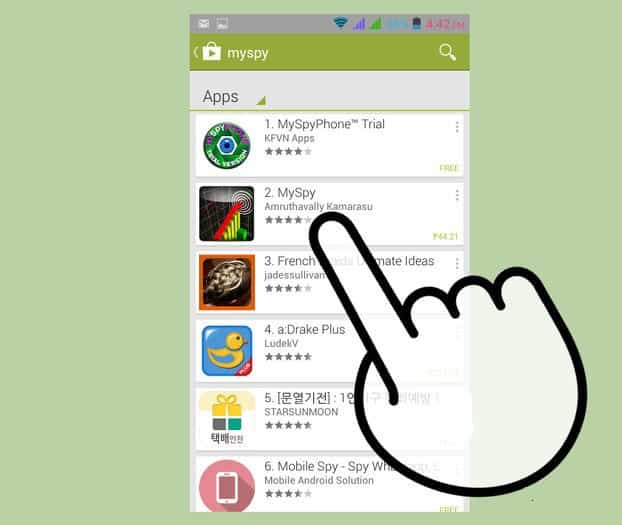
Step 1 : Download the "SPY APP" .


myspy-app

           various spy apps or program are offered by various app providers. Study and analyse in order to find the best spy program. you need to consider the following factors to select a genuine app.

Step 2 : Purchase and install best spy app.

ACCEPT-to-install-myspy-app
This app must be installed on your phone as well as the victim's phone..

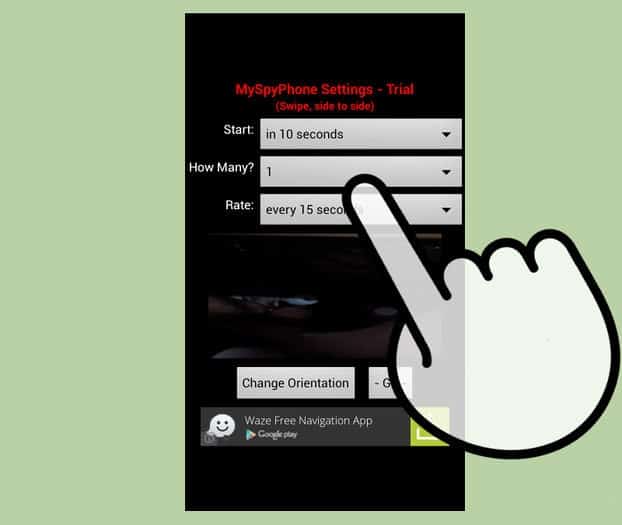
Step 3 : Configure the app and initiate trackinG

Set-time-in-myspy-app


              Follow the instruction so as to install the app and make sure that you complete all the settings properly so as to start the hacking process.

Now, you can receive all the conversation on the victim's account.
Successfully,you have accessed the whats app account of your friend on your phone...


Monday, 13 February 2017

Activation of windows

How to active your windows 


If you are using a fake version of windows  so that message you can see again and  again that "WINDOWS ACTIVATION". 


Here is a trick to active windows.....


Step : 1 Download the microsoft toolkit software.


Step : 2 Run the software.


Step : 3 Choose type of product that you  want to activate. here you can see the picture....


Step 4 : press on EZ-Activator.


Now wait for a minute ,then you can see the activation line in information console...     


Saturday, 11 February 2017

Know about Windows 10 Edition,Version, OS build running on your PC

How to know which widows 10 Edition, Version, OS Build running on your pc


                  "Windows 10" is the latest release from Microsoft Corporation and the new release like windows 11 or so in not not expected soon. There are four addition of windows 10 such as windows 10 home, professional, enterprise and education version. There are numbers of "versions" and "OS Build" lines also.

WINDOWS 10- HOW TO ENABLE FIND MY DEVICE FEATURE.....

  • Press windows key or click start button. 
  • Next click three line on top left of the start menu.  
  • Next click setting.  
  • Next click system.  
  • Click "About".  
  • Here you will see detailed information about your system which will include Windows 10 edition, version, system type(32 bit or 64 bit) and OS build. 
  •  The short cut is also available, ask Cortana (Write "About"in "Ask me anything") the "About" screen will appear directly.